Launchpad Series · 01 / Why it exists
After Upgrading to macOS Tahoe, I Still Prefer the Old Launchpad
macOS still gives you ways to open apps, and Spotlight is still useful. IconPane exists for a narrower reason: some Mac users want to keep the visual Launchpad workflow they already know.
The new system has app entry points
macOS Tahoe provides its own ways to browse and open apps, including the Apps entry in the Dock and Spotlight. Apple explains those options in its guide to viewing and opening apps on Mac.
Looking for a Launchpad alternative does not mean the new system cannot launch apps. The question is whether the path to an app still feels natural for people who relied on the old Launchpad.
Apple Support: view and open apps on Mac
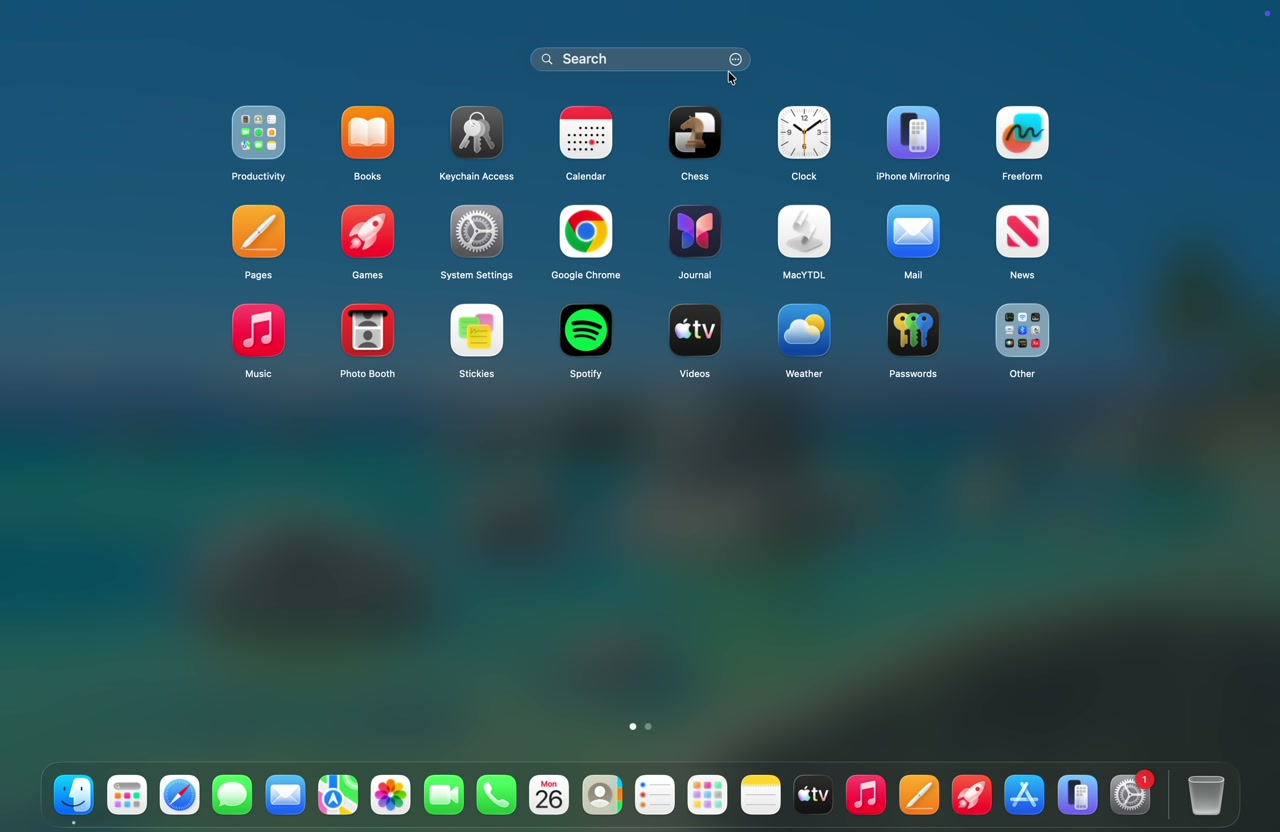
A familiar grid still has a job
Search is fastest when you remember the name. A grid helps when you remember the icon, the folder, or the rough position on the page.
That matters for apps you do not open every day. Browsing a visual grid can remind you that the right tool is already installed, even before you remember its exact name.
Your own app order becomes memory
Everyone organizes apps differently. Some people group work tools together, put utilities on a separate page, or hide rarely used apps inside folders.
Over time, those positions become part of how you use the Mac. IconPane is designed to preserve that kind of spatial memory.
What IconPane keeps
IconPane centers on a Launchpad-style app grid with pages, sorting, folders, and search. In 1.3.16 it opens from the menu bar, Dock, global shortcut, hot corner, or a four/five-finger trackpad pinch. Trackpad gestures and per-app launch shortcuts are Pro features available during the 14-day trial; only gestures require Accessibility permission.
IconPane is an independent app. It does not restore Apple system components or replace Dock and Spotlight. It gives old Launchpad users a familiar launcher they can keep using on newer macOS versions.
If you miss the old Launchpad too
Start by watching the demos and trying the grid with your real app library. Move the apps you open most often, create a few folders, and see whether the workflow fits your habits.
If the new macOS app entry points already feel right, you may not need IconPane. The app is for people who want the old Launchpad style back in their daily flow.
What is current in IconPane 1.3.16
IconPane 1.3.16 requires macOS 15.6 or later and is verified on macOS Tahoe. The same app grid can be opened from the menu bar, Dock, global shortcut, hot corner, or a four/five-finger trackpad pinch.
- Localized search: match local names, Pinyin or romaji, initials, and common spelling variants. Frequent apps can be prioritized by launch frequency and recency.
- Smart folders and workspaces: use three read-only rules: Recently used, Installed in the last 7 days, and Unused for 30 days. Save three layouts and switch with ⌃⌥⌘1–3.
- Daily controls: customize app search sources, hide apps, compact pages, choose the overlay display and Dock visibility, and rely on automatic app-list refresh.
- macOS 26 polish: the search bar and folders use Liquid Glass on macOS 26 while the grid remains available on macOS 15.6+.
Trackpad gestures and per-app launch shortcuts are Pro features and can be tried for 14 days. Only trackpad gestures require Accessibility permission.